Sunday, 15 August 2021

My favourite free resources for learning how to code

It's scary to switch careers. When you want to switch as a software engineer, there are number of resources available for free to learn coding. Sometimes you even get confused where to start and how. So I've just decided to share it in only one article

Getting started

Before diving into it, I've done some quick research on what you need to know at least to become a developer. For the web development, the answer was pretty much HTML, CSS and JavaScript. So that is what I started with.

Khan Academy  : A great resource to make strong your computer science fundamentals and programming. 

Codecademy : A perfect resource for beginner to start learning web development. Their explanations are quite clear and they try to visualize thing where they can. 

Sololearn : A learning platform for bitesized lessons, little quizzes and challenges for all languages. You can collect points and level up as you complete the lessons. There are web and app versions available. You can choose according to your own pace. 

freeCodeCamp : A good start to learn reponsive web design and data structure and algorithms. Don't feel intimidated if you're just starting out. It takes some time to learn to implement an algorithm after you understand it conceptually. If you feel stuck, the best thing to do is to take a break. Break a problem into little steps and try to solve one by one. To learn in a better way, never use computer or laptop to write down your code for the first time. Write your solution on the piece of paper and try to debug it. Talking it with another person is also very useful. FreeCodeCamp also has an active Youtube Channel and a Discord Server that you can join.

The Odin Project : It has an open source curriculumto learn full satck development with JavaScript or Ruby on the backend. The odin project requires you set up your own environment which may feel daunting at first, but it's a great step towards buiding your first project! They also have an active Discord Server where you can find study buddies and share your progress with fellow learners. 

Whilst these were the main resources to start with, there are many more websites that I found very helpful.

For CSS

Flexbox Froggy : A game for learning Flexbox.

Grid Garden : A game for learning CSS Grid. 

CSS tricks : A great website for more in-depth information and helpful tricks about CSS. 

MDN Dev Docs - CSS : A great referance to visit but not as visual as  CSS tricks. 

Frontend Mentor : A website for frontend challenges. They provide you with the requirements and images if needed and you try to code the project as best as you can. Once you're done with solution and submit, their community can provide you with the feedback.

For JavaScript 

Wes Bos JavaScript 30 : Thirty fun little projects to learn JavaScript

JavaScript.info : Great for learning JavaScript concepts and JS tutorials. 

Traversy Media : YouTube channel with lots of great intros

 Dev Ed : Another great YouTube channel for enhancing your web development skills. 

Web Dev Simplified : All in one platform for web development

Eloquent Javascript : A well-written book about JavaScript with helpful exercises

You don't know JS : A book series to learn more about the weird parts of JavaScript

Node School : Tutorials for learning Node.js (JavaScript on the backend)

MDN Dev docs - JavaScript Guide : Good to take referance 

For Coding Challenges

CodeWars : Fun way to practice your JavaScript skills. You collect points as you solve coding challenges. You can filter challenges by language and difficulty level. Make sure you don't rush through it, take your time to undestand why your solution works and why doesn't. After you solve it, you can look at other people's solution. Be careful not to confuse the highest voted or shortest solution with the best one.

LeetCode : Prominent for solving coding challenges. You can solve problem in any language of yor choice. You can also see efficiency of your solution compared to the other people's solution. You can see space and time complexity of your solution in graph and compare where you stand. 

There are many more code challenges website like CoderByte, HackerRank and Exercism. You can choose according to your convenience and move forward. 

For more resources

Hackr.io : You can find both paid and free resources for all kinds of languages on here, including JavaScript. 

Bento : You can find learning paths for different topics. 

That's it. I hope this list is helpful for you. If you're completely new to coding, I would suggest focusing on one resource first and then move to others as you try to learn more. Jumping between websites can actually be quite distracting and makes you confuse. 

Also remember that you don't need to know it all. I can assure you that there's a lot learnt during self-studies that you don't actively use at work, and a lot that you only learn at your work. So according to me, a great strategy will be to get fundamentals right, build some projects to showcase your skill, and then apply for the job. That way, you'll find out sooner what you want. 

So happy learning! You can do it!


Understand CSS position easily - Background Concept

We all know that CSS position property is too confusing sometimes. When you design a layout, you think of positioning elements. Although, there are number of options available for designing layout, CSS position property is one of the options. 

This article aims to explain this property in a simpler manner.  

Let's take a simple analogy to understand. 

Packing and positioning

Imagine you're packing a backpack to go somewhere. How do you arrange items in backpack ? If you drop everything inside backpack without arranging one by one, everything in the backpack will have it's own position automatically without you assigning it. But if you arrange the way you want, you assign a dedicated position to every items inside back. 

Now, think your backpack as a webpage. And items inside backpack as elements on webpage. So how do you arrange your elements on webpage. 

Normal flow

If you add items in backpack without arranging it, they got positioned themselves based on space available. Same thing happens to webpage. When you add elements to it, they positioned themselves based on rules defined by the normal flow.   

There are two types of elements on web page. 

1. Block-level elements.

2. Inline elements 

Block level elements are the elements that occupies entire horizontal line such as <h1>, <div>, <p> etc. Two block level elements can't be on the same line without styling. 

Inline elements doesn't occupy entire row. It occpies the space according to its content. Examples are <a>, <img>, <span> etc. They line up next to one another horizontally; when there isn't enough space left on the line, the content moves to a new line. 

Now Let's see how can we manipulate these default behaviour with CSS. 

CSS Position property

 This property provides facility to arrange elements as we want.There are 5 possible values of this property. 

  • Static position
  • Relative position
  • Absolute position
  • Fixed position
  • Sticky position

Static Position

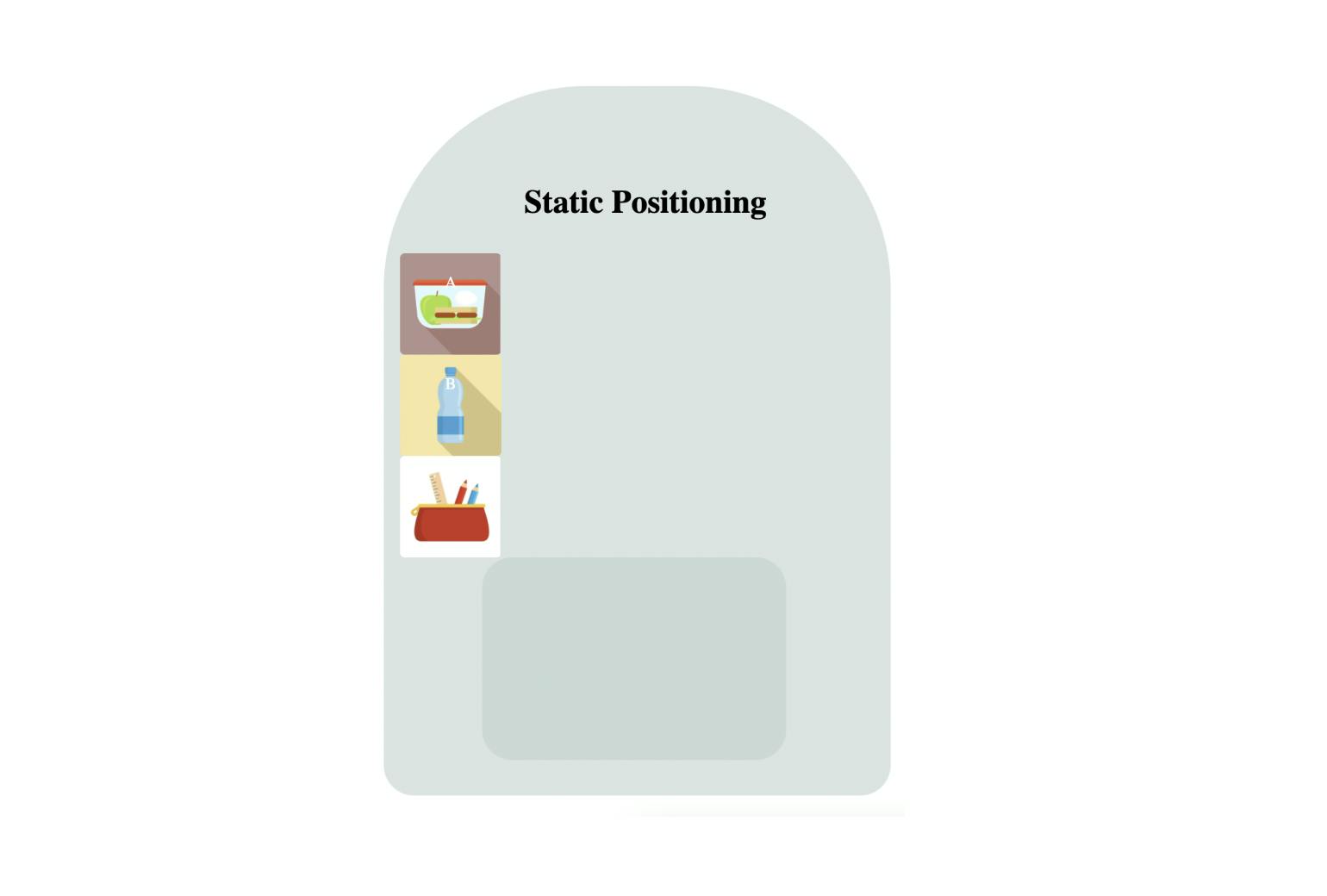
This is the default or normal positioning. So, if we take a backpack without arranging it, items inside it take default position. Same way, if you added 5 elements to web page, it will take the default position based on types of elements

No image to show

In the above picture, items in the backpack are arranged one after another. Because each item's position is static which is the default value. 

Relative position

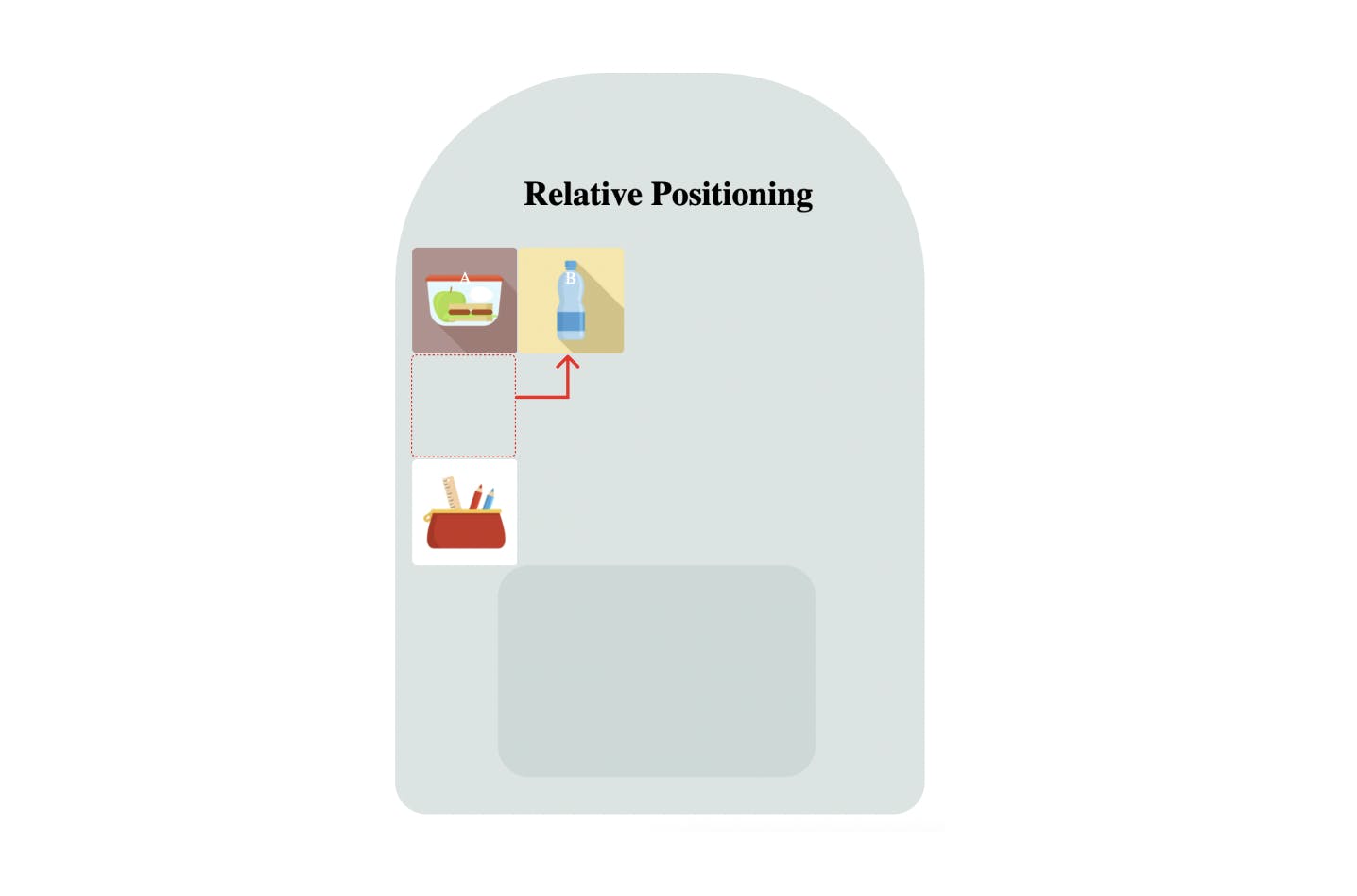
This position makes your item to move relative to its current position. If you want to move your water bottle next to the lunch box, you have to assign the position as relative. In relative positioning, when you change the position, the original space of the specific element will not remove from the normal flow. To make picture clearer, look at the below picture. 

 No image to show

Here, bottle has moved next to lunchbox, but the space occupied by bottle remains blank because it will not get removed from the normal flow. 

Absolute position

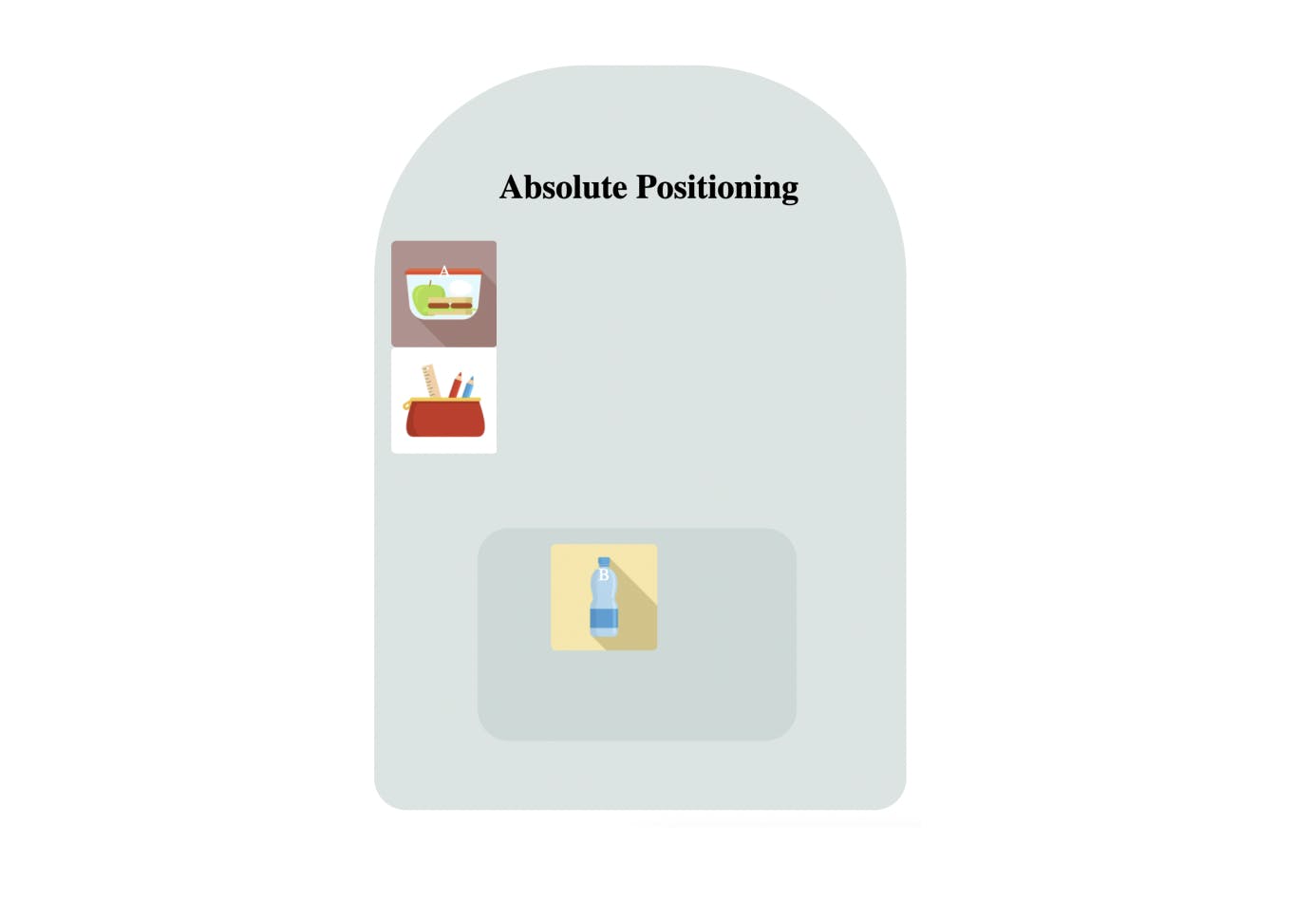
This is a tricky one to explain with example. Let's say you want to put your waterbottle inside the pocket of backpack. If so, then this pocket should be positioned other than its static position. So we can place it inside the pocket in an exact position. And this position is decided relative to the pocket. If the pocket doesn't have any position assigned to it other than static, element's nearest ancestor should have position other than static. If this isn't the case then absolute positioned element will move to the top right corner of the backpack. That means it will position itself relative to the backpack. 

Simply, it means that the parent element must have a position property value other than static for the absolute position to work. If there is no element with a position property value, the element will be positioned relative to the viewport. Check the picture below.

No image to show

Here, water bottle has moved inside the pocket and space occupied by it is no longer there. Pencil box has moved to position of water bottle. 

Fixed position

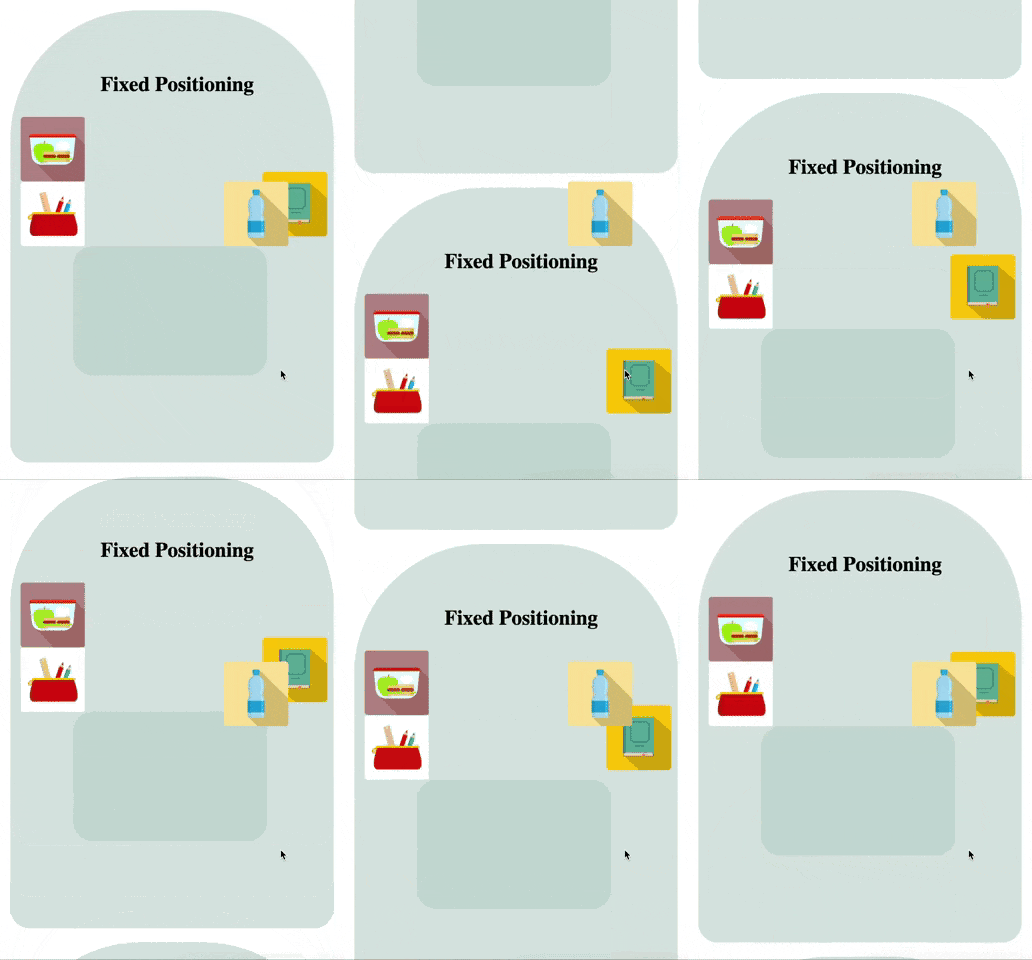
Fixed position is like placing your items wherever you want, regardless of whether there are items in that place or not. Element with fixed position is positioned relative to its viewport which means it always stays in the same place even if the page is scrolled.  Look at the picture below.

No GIF to show 

Water bottle remains fixed even if page is scrolled. 

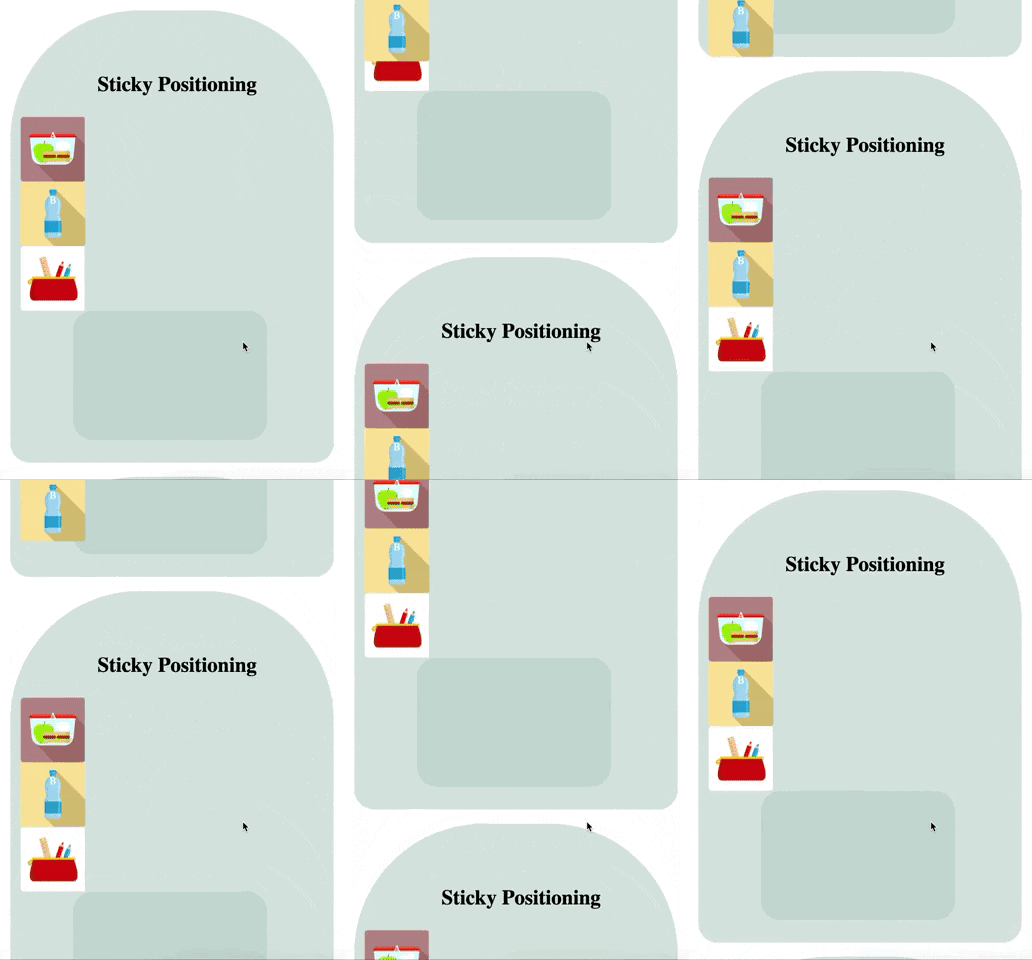
 Sticky position

This is also a tricky position to explain with this example. As the name says, it means that you stick your item into a particular place. For example, if you stick your bottle on top of your backpack, it will stick in that particular position in your backpack when you scroll up and down the backpacks. 

The behavior of sticky position is a combination of relative and fixed positions. Simply, inside the backpack, it will act as a fixed position and not move. But when you scroll to the second backpack, it sticks with the first backpack and moves relative to it. 

No GIF to show

Did you notice how it sticks on th top of backpacks when it moves ? 
 
Alright, I hope you understand the concept behind the how CSS position works. I hope this article helped you to understand in a better way.  Don't forget to share your feedback, I would love to hear your thoughts. 

Wednesday, 30 June 2021

Library Vs Framework

Many people confuse between Library and Framework. Here, my purpose to write this article is to turn that confusion to clarity. 

Library : 

Library is a predefined code which we use in our program directly. For example, if we are coding in C language, we use printf function. This function is defined in library called 'Stdio.h'. We don't have to write code for printing from scratch. We use that readymade function from library. 

Suppose we want to make text-to-speech or speech-to-text converter. Now, this is a challenge for us. But C++ provides library namely "Flite or Festival libraries." We just need to use it. There is no need to write code from scratch. 

As a software engineer, we can buid our own libraries if we're quite proficient and can make it open source. Or else we can charge for it. 


Framework : 

Framework itself is a software to make particular kind of application. For Example, Mobile App, web app. 

Suppose we want to make a web application. We've two option. 

1. Write code from scratch. Organize file structure as per requirement. 

Here, there is possibilities of code redundancy. We may not write code so professionally. 

But instead if we use framewrok , our task become easy. 

2. Use Framework

We can use this to make application. For Example, JavaScript's popular frameworks for web application are Angular, React etc. 

Frameworks provide sections/frames to write particular kind of code. For Example, section for business logic, section for designing, section for URL  configuration, section for settings etc. Hence, it provides a proper architecture to write code. 

Frameworks solves scalability and security issues also. If we want to migrate from one system to another we can do it easily.

Comparison between Library and framework 


Thanks for reading. Hope it helps:))

Thursday, 13 May 2021

OOPS in JavaScript

JavaScript OOPS Concept

Classes : 

A class is simply a template for creating object. 

Classes are just special function. You can define class as you define function expression and function declaration.

Component of Class Syntax : 

1. Declaration

2. Expression 


Above is two ways to define a Class.

To define a class, 

 - Use class  keyword. 

Always add a method named constructor():


1. Class declaration : 

This is One way to define class 

Example : 

class Rectangle {
  constructor(height, width) {
    this.height = height;
    this.width = width;
  }
}

This Example creates a class named Rectangle. 

It has two initial properties : height and width.


Hoisting : 

An important differance between function declaration and class declaration is hoisting. 

Function declarations are hoisted while class declarations are not.

You first need to declare your class before accessing , otherwise code will throw an error. 


2. Class Expression :  

It is another way to define a class.  

It can be named or unnamed. 

The name is given like a variable. 

Example :

let Rectangle = class {
  constructor(height, width) {
    this.height = height;
    this.width = width;
  }
}


Though, name can be retrived using class' name property. Like, 

 console.log(Rectangle.name);


Constructor :

It is a special method for creating and initializing object. 

When an object of the class is declare, this method is called automatically. 

If constructor method is not defined, Javascript will add an empty one. 


Object : 

Like any other programming languages, Object in Javascript is a standalone entity. 

It can be compared with real-life object. 

Example : 

A mobile phone is an object. It has a RAM, processor, weight, material it is made of etc.

Similarlly, JavaScript objects can have properties, which define their characteristics/ properties. 

Access properties with simple dot nation. 

ObjectName.PropertyName 


There are different ways to create new objects : 

1. Using object literal - (for single object)

2. Using new  keyword. - (for single object)

3.Using Object constructor. - (for multiple object creation)

In ECMAScript 5, an object can also be created with the function Object.create().


 1. Using Object literal : 

It is a list  of  {name:value} pairs.

define and create object in one statement. 

 Example : 

var person = {firstName:"John", lastName:"Doe", age:20, weight:80};

//It can span mutilple lines. Brackets and spaces are not important. 

var person = {

firstName:"John", 

lastName:"Doe", 

age:20, 

weight:80 

};


2. Using new keyword : 

var person = new Object();
person.firstName = "John";
person.lastName = "Doe";
person.age = 20;
person.weight= 80;  


3. Using object constructor : 

Sometimes we need a "blueprint" for creating many objects of the same "type". Here object constructor function come into picture. 

Example : 

function Person(first, last, age, weight) {
  this.firstName = first;
  this.lastName = last;
  this.age = age;
  this.weight= weight;
}

 Here, Person() is object constructor function. 

objects can be created by calling constructor function with new keyword.

var myFather = new Person("John", "Doe", 50,80);
var myMother = new Person("Emma", "Rally", 48, 60); 


this keyword : 

It is the object itself. 

It is the substitue for new object.

The value of this will become the new object when a new object is created.


Class Inheritance : 

Class inheritance is a way for one class to extend another class. 

We use extend  keyword to inherit child class from parent class. 

Let's say we have a class Bird

class Bird{
  constructor(name) {
    this.speed = 0;
    this.name = name;
  }
  fly(speed) {
    this.speed = speed;
    alert(`${this.name} flies with speed ${this.speed}.`);
  }
  stop() {
    this.speed = 0;
    alert(`${this.name} stands still.`);
  }
}

let bird= new Bird("Sparrow");


  Now, let's represent this graphically.

Graphical representation of Class


Now, we would like to create another class 'Sparrow' .

As the sparrow is a bird, it can have access to bird methods. It can do what a 'generic' birds can. 

Let's inherit sparrow class from Bird. 

class Sparrow extends Bird{
  hide() {
    alert(`${this.name} hides!`);
  }
}

let sparrow= new Sparrow("White Sparrow");

sparrow.fly(5); // White sparrow fly with speed 5.
sparrow.hide(); // White sparrow hides!

 Object of Sparrow class have access to both class' (Bird and Sparrow) methods. 

i.e. sparrow class method- sparrow.hide()

    Bird class method - sparrow.fly()


Extend keyword works using old prototypes. It sets Sparrow.prototype.[[prototype]] to Bird.prototype

If  a method is not found in child class (Sparrow.prototype), JavaScript searches it in parent class (Bird.prototype).

Graphical representation of Inheritance

To find sparrow.fly() method, the engine uses bottom-up approach. 


1. The Sparrow object. (has no fly method )

2. prototype of sparrow object that is Sparrow.protype ( which has no fly() method but has hide() method)

3. prototype of it's parent that is Bird.protype (due to extend) (which has fly() method and it runs finally)


Learn more about inheritance here.  


Overriding : 

JavaScript only supports method Overriding, not overloading. 

If you use multiple function with the same name, last one will override previous one. 

1. Override default function : 


function alert(msg) 
{
   console.log(msg);
};
alert("This is an alert."); //it won't show alert box
                              like usually.It will now 
                              log the message in
                              console as we've 
                             Ioverride it.


2. Override previous definition of function : 

//Calculate area of rectangle
function calculateArea(x, y){
	return x*y;
}
function calculateArea(x){
	return x*x;
}
console.log("Area of rectangle 2x3 is : " + calculateArea(2, 3)); // answer : 4
console.log("Area of square 5x5 is : " + calculateArea(5)); // answer : 25

Here, we've override the function. So calculateArea(2,3) will now return 4 instead of 6.


3. Override parent class method. 

Suppose we've two class. Consider an above example of inheritance. 

Sparrow class is inherited from Bird class. Bird class has a method named fly() and Sparrow class a method called hide().

Now, if we want to change behaviour of fly() method in child class. This method in parent class alerts speed of a sparrow.

class Bird{
    constructor(name) {
    this.speed = 0;
    this.name = name;
  }
 
 fly(speed) {
    this.speed = speed;
    alert(`${this.name} flies with speed ${this.speed}.`);
  }
 
 stop() {
    this.speed = 0;
    alert(`${this.name} stands still.`);
  }
}

class Sparrow extends Bird{
 
    hide(){
        alert(`${this.name} hides!`);
    }
 
 
 //override parent class method fly()
    fly(speed){
        console.log('sparrow flies');
    }
}

let sparrow= new Sparrow("White Sparrow");

sparrow.fly(5); // sparrow flies
sparrow.hide(); // White sparrow hides!

Here, fly() method will just log the message in console. 

Now, call parent class' fly() method. 


class Bird{
  constructor(name) {
    this.speed = 0;
    this.name = name;
  }
  fly(speed) {
    this.speed = speed;
    alert(`${this.name} flies with speed ${this.speed}.`);
  }
  stop() {
    this.speed = 0;
    alert(`${this.name} stands still.`);
  }
}

class Sparrow extends Bird{
 
  hide() {
      alert(`${this.name} hides!`);
  }
  //override parent class method fly()
  fly(speed){
 
     // call parent class' method fly() 
     // use super keyword to do so
 
    super.fly(5);
    console.log('sparrow flies');
  }
}
let sparrow= new Sparrow("White Sparrow");
sparrow.fly(5); // alert box - White sparrow flies with speed and  log message -
                  sparrow flies 
sparrow.hide(); // White sparrow hides!  

Changes is represented with blue line in above example when calling parent class' fly() method. 


Abstraction : 

Abstraction is a way of hiding implementaion details from user and showing only functionality to user. 

Let's have one Example : 

We want to calculate employee's total salary monthly : 

Total salary is : BaseSalary + monthlyBonus 


function Employee(name,age, baseSalary)
{
    this.name =name;
    this.age = age;
    this.baseSalary = baseSalary;
    this.monthlyBonus = 1000;
    this.calculateFinalSalary = function(){
        let finalSalary = this.baseSalary + this.monthlyBonus;
        console.log('Final Salary is : ' + finalSalary);
    }
    this.getEmpDetails = function(){
        console.log('Name : ' + this.name + ' | Age : ' + this.age)
    }
}
	
    let emp1 = new Employee('John', 30, 2000);
    emp1.getEmpDetails();
    emp1.monthlyBonus = 20000; // direct access to monthlybonus property 
    emp1.calculateFinalSalary(); // final salary will be 2000 + 20000 
                                    insted of  2000 + 1000
                                    due to direct access to monthlybonus property
 

To avoid this issue, abstraction comes into picture. 

use monthlybase as a varible. 

 Using abstraction :


function employee(name,age, baseSalary)
{
	this.name =name;
	this.age = age;
	this.baseSalary = baseSalary;
	let monthlyBonus = 1000;           // Take monthlyBonus as variable 
 
        let calculateFinalSalary = function(){
	    let finalSalary = baseSalary + monthlyBonus;
	    console.log('Final Salary is : ' + finalSalary);
	}
 
        //Call calculateFinalSalary function here.  
        this.getEmpDetails = function(){
	     console.log('Name : ' + this.name + ' | Age : ' + this.age)
             calculateFinalSalary();		                 
	}
}
	let emp2 = new employee('John', 30, 2000);
	emp2.getEmpDetails();         // final salary will be 2000 + 1000 = 3000 
                                         now as expected

 Learn in detail about abstraction here

This was all about JavaScript OOPS concepts. Thanks for reading:)